
Pocket Option Demo Account: Free Practice, Login and Switching to Real
Pocket Option demo account explained: how the free demo works, demo login and sign up, QT Demo vs QT Real, refilling virtual funds and when to switch to real.

The Pocket Option demo account is free: you trade the platform's live charts with virtual money, and Pocket Option's own blog describes a $50,000 practice balance that you can top up whenever it runs low. You switch between demo ("QT Demo") and real ("QT Real") by clicking the balance at the top of the screen. The demo is the right place to learn the buttons and test your rules. Its weakness is that losing virtual money feels nothing like losing your own.
What the Pocket Option demo gives you
| Feature | Demo account | Real account |
|---|---|---|
| Cost | Free | Real deposit (from $5 per Pocket Option's blog; varies by method) |
| Balance | Virtual, about $50,000 per Pocket Option's blog | Your own money |
| Top-up | Unlimited, manual ("Top up" on the balance) | Via cashier deposit |
| Charts, assets, indicators | Same platform | Same platform |
| Withdrawals | Not possible | Possible after verification |
| Bonuses, tournaments, cashback | Not available | Available (with conditions) |
| Express trades | Reported as not available | Available at higher account levels |
| Time limit | None stated | None |
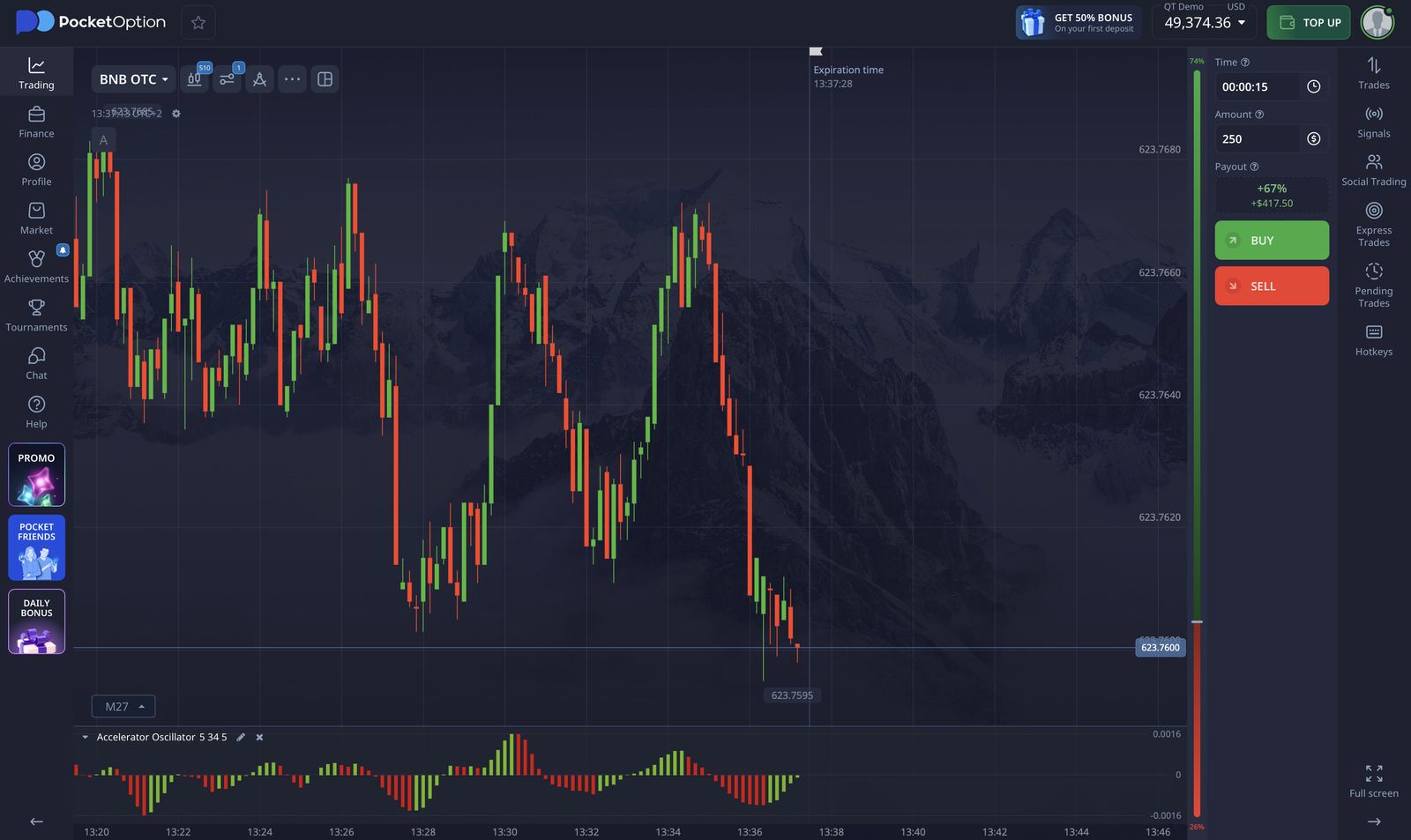
Pocket Option's blog states the demo has no time limit. Payouts on the demo generally mirror those shown on real, but the percentage changes with the asset and time of day on both, so always read the number next to the asset.
Pocket Option login demo sign up: how to get access
Option 1: Try the demo from the homepage
Pocket Option's website has a "Try demo in one click" link that opens the trading room with virtual funds. This is fine for a first look, but progress may not be saved between sessions without an account.
Option 2: Register and use the demo inside your account
- Go to the official Pocket Option site (type the address yourself; fake look-alike domains exist).
- Sign up with email or a Google account.
- Confirm your email address.
- Log in. The trading room opens, and you can select the demo balance from the balance menu.
You do not need to deposit or verify your identity to use the demo. Registering keeps your demo history in one place, which matters when you analyse 100+ trades. If you want to follow along, you can open a free Pocket Option demo now.
Pocket Option demo login on later visits
Use the same email and password (or Google sign-in) on the web, the Android app or the desktop app. Your demo and real balances live in the same account, so the demo login is simply your normal login with the demo balance selected.
Note: If a website asks you to enter your Pocket Option password to "activate a demo", "activate signals" or "connect a bot", do not do it. The only place to log in is the official site or official app.
QT Demo vs QT Real: what the labels mean
"QT" stands for Quick Trading, Pocket Option's standard fixed-time binary options mode (the platform's support account has used that expansion when replying to users on review sites). So:
- QT Demo = Quick Trading with virtual money.
- QT Real = Quick Trading with your deposited money.
The demo menu also includes a separate MetaTrader (forex/CFD) demo option, according to Pocket Option's blog. That is a different product from binary-style Quick Trading. See the app and MT5 guide for details.
How to switch from demo to a Pocket Option real account
- Click your balance at the top of the trading screen.
- Select the real account (QT Real).
- If the real balance is zero, the platform prompts you to deposit through the cashier.
Switching takes one click, which is also the danger: some traders place real trades believing they are on demo. Check the balance label before every session. The colours and labels differ between modes, but it is easy to stop noticing them.
Before you switch, read our minimum deposit guide and decide whether you want a deposit bonus at all, since bonuses carry turnover conditions.
Pocket Option demo trading: how to make the practice count
A $50,000 virtual balance invites careless trading. Use the demo as a test environment:
1. Pretend you have your real balance
If you plan to deposit $100, trade the demo as if you have $100. Stake $1–2 per trade. With $50,000 on screen, $500 trades feel normal, and that habit will empty a small real account quickly. You cannot reduce the demo balance, so track your "pretend" balance in a spreadsheet.
2. Trade written rules
Decide your setup, asset, session and expiry before you click. If you cannot write the rule down, you cannot test it. Building a trading plan shows the format.
3. Collect a real sample
Twenty trades tell you almost nothing. Aim for at least 100 trades on the same rules, logged in a trading journal.
4. Compare against break-even
| Payout | Break-even win rate |
|---|---|
| 92% | 52.1% |
| 85% | 54.1% |
| 80% | 55.6% |
| 70% | 58.8% |
Break-even = 1 / (1 + payout). If your demo win rate is not clearly above the line for the payout you trade, the strategy is not ready. The break-even calculator and expected value calculator do the maths for you.
Example: 120 demo trades at an 85% payout, 63 wins and 57 losses. Win rate 52.5%, below the 54.1% break-even. With $10 stakes: 63 × $8.50 − 57 × $10 = −$34.50. A small loss, and a clear signal that the rules need work before any real money.
5. Test OTC and regular markets separately
OTC assets (often the only ones open at weekends) are priced by the broker's own feed. A setup that works on regular EUR/USD may behave differently on EUR/USD OTC. Log them separately.
Limits of a demo account
- No emotional pressure. Most beginners trade worse with real money, often by overtrading or chasing losses. Expect your live results to be weaker than your demo results at first.
- Unlimited refills hide bad habits. On real money there is no "Top up" button that resets your mistakes.
- Past results do not guarantee future results. A good demo sample shows the rules worked in that period, nothing more.
- Execution and bonus conditions apply only to real accounts, so demo numbers ignore bonus turnover locks.
Our broker-neutral guide on how to use a demo account covers the testing process in more depth.
When to move to real money
Move only when all of these are true:
- 100+ demo trades on the same written rules.
- Win rate clearly above break-even for your typical payout.
- You followed your daily stop rule on most days.
- You have checked that trading with an offshore broker is allowed where you live. See legal status by country.
Then start with the smallest deposit you can afford to lose and the same stake size you used on demo. If you have not set up an account yet, try the Pocket Option demo first.
FAQ
Is the Pocket Option demo account free?
Yes. Registration and the demo are free, and you can top up the virtual balance at any time. You never need to deposit to keep using it.
How much money is in the Pocket Option demo?
Pocket Option's blog describes a $50,000 virtual balance. You can refill it manually by clicking the balance and choosing "Top up".
What is QT Demo on Pocket Option?
QT Demo is the Quick Trading (standard fixed-time trading) mode with virtual funds. QT Real is the same mode with your deposited money.
Can I withdraw profits from the Pocket Option demo?
No. Demo profits are virtual. Only money on a real account, after verification, can be withdrawn.
Is Pocket Option demo trading the same as real trading?
The platform, charts and assets are the same, but bonuses, tournaments and Express trades are real-account features, and your emotions behave differently with real money. Treat demo results as an upper bound.
Key takeaways
- The Pocket Option demo is free, has no stated time limit and can be topped up any time.
- QT Demo and QT Real are the virtual and real versions of the Quick Trading mode, switched from the balance menu.
- Trade the demo with the stake size you will use on real money, not the $50,000 balance.
- Judge results over 100+ trades against the break-even win rate for your payout.
- Expect live results to be worse than demo at first, and start real trading small.

Recommended broker
Practise this on a free Pocket Option demo
Free demo account, $1 minimum trade and payouts up to 92%. Test everything with virtual money first.
Binary options are high risk and not available in every country. Check the legal status where you live.
Next in Pocket Option Guides
Pocket Option Minimum Deposit, Minimum Trade and Deposit Methods
This guide is for educational purposes only and is not financial advice. Binary options are high risk and banned for retail clients in many countries. See our risk disclaimer.
Keep learning
Pocket Option Tutorial: A Step-by-Step Walkthrough for Beginners
Pocket Option tutorial for beginners: sign up, practise on the demo, read the interface, place a trade, set expiry, check history, deposit and withdraw safely.
9 min read · 17 Aug 2026Pocket Option GuidesPocket Option Minimum Deposit, Minimum Trade and Deposit Methods
Pocket Option minimum deposit is from $5 and trades start at $1, per the broker. Deposit methods, INR amounts, account levels and bonus terms to check.
7 min read · 25 Aug 2026Pocket Option GuidesPocket Option App Download: Android, iPhone, PC and MT5 (Official Options Only)
Pocket Option app download guide: the official Google Play app, APK, iPhone web app, Windows PC version, MT5 access and web login, plus how to avoid fake APKs.
8 min read · 7 Sept 2026